Applied Project-Based
Learning Handbook
Building real-world skills through authentic projects and industry partnerships — a 10+ year model for instructors, coordinators, and institutions.
Are you an instructor looking to implement PBL at your institution?
What is Project-Based Learning?
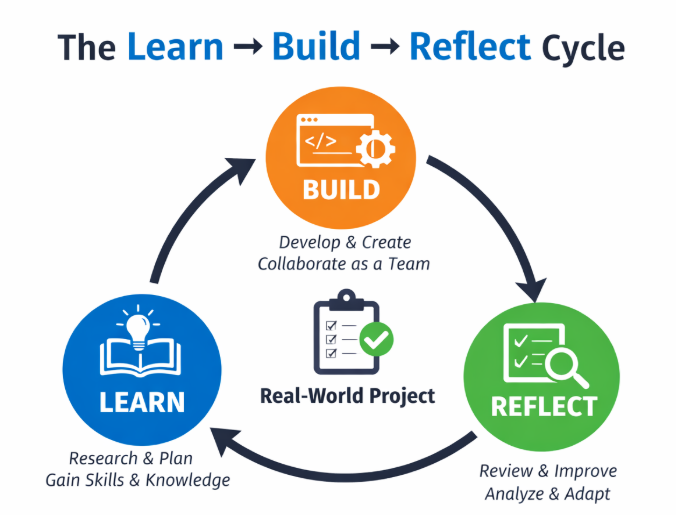
Students learn by working on real-world projects through a continuous cycle — developing both technical and professional skills over time.
Gain skills and knowledge through structured exercises and foundational coursework.
Apply knowledge by building real or realistic projects in collaborative team settings.
Evaluate what worked, what didn't, and how to grow — then repeat the cycle.
What Makes GRC's Program Unique
At Green River College, this system spans the full student journey. Early (100 and 200-level) coursework introduces foundational practices such as pair programming and collaborative problem-solving. Mid-program experiences use increasingly complex projects that build professional skills through resume development, LinkedIn integration, and GitHub scaffolding. Students then engage in experiential learning opportunities such as micro-internships and associate-level capstones, culminating in a two-quarter senior capstone that includes both client-based and open-source projects.
- Spans the full student journey — 100-level through senior capstone
- Over 50% of SDEV courses use PBL approaches
- Curriculum designed backward from capstone goals
- Integration of Agile workflows and real client projects
- 10+ years of iteration, informed by student and industry feedback
- Both client-based and open-source project options
Program History & Evolution
What You'll Find Here
- A scaffolded PBL curriculum model from entry-level courses through capstone
- Descriptions of course design, project structures, and instructional strategies
- Real artifacts: project briefs, sprint boards, retrospectives, student deliverables
- Lessons learned from 10+ years of iteration, including challenges and failures
- Templates, activities, and teaching materials adaptable to other programs
- Guidance for implementing this model at other institutions
The Scaffolded Student Journey
Skills build progressively — from early coursework through senior capstone. Agile and team formation are embedded throughout.
Early Skill Building
- Pair programming (driver/navigator model)
- Resume, LinkedIn & GitHub development
- Instructor-guided projects
Associates Capstone (Midstone)
- Real client project with defined focus
- Dashboards, data viz, scheduling tools
- Some COIL (collaborative online international learning)
Web Dev Frameworks — Agile
- Instructor as Product Owner
- Two-week sprint cycles with clients
- Sprint reviews and retrospectives
Two-Quarter Capstone
- Full Scrum — client & open source options
- Real stakeholders, deployment
- 6 months of engagement
↳ Early-Stage Skill Building
Pair programming is introduced as a structured way to develop both technical and interpersonal skills.
Driver/Navigator Model
The driver types and implements code, focusing on the immediate task. The navigator reviews the code, thinks about design decisions, spots mistakes, and considers what comes next — like a road trip where one person drives while the other reads the map.
- Typically once per week, ~30 minute sessions
- Handouts distributed after pairing (prevents solo work)
- Rotating roles and structured exercises
- Outcomes: stronger collaboration, improved communication, higher code quality
Professional development is embedded throughout the curriculum rather than treated as a one-time activity.
- Resume development across multiple courses
- LinkedIn profile creation and iterative refinement
- Regular usage of GitHub for project documentation
- Explicit assignments documenting real projects, GitHub work, and outcomes on LinkedIn and resume
- Focus: articulating skills, capturing accomplishments, preparing for internships and jobs
Agile & Team-Based Workflow
Agile practices are introduced early and expanded progressively, culminating in full Scrum implementation during capstone.
Standups
Standups are short, structured team check-ins designed to improve communication, accountability, and project visibility. Within 5 minutes, all team members answer three questions:
- What have you done?
- What are you doing?
- What are your blockers?
The Scrum Master facilitates the discussion and ensures all team members participate. Over time, students learn to provide concise status updates, coordinate work across teammates, and support one another in overcoming obstacles.
Sprint Planning
Sprint planning sessions help teams decide which tasks and user stories can realistically be completed during the upcoming sprint cycle. Students review project priorities, discuss technical complexity, estimate workload, and collaboratively determine how work should be divided.
This process encourages students to think critically about scope, time management, and team capacity while practicing project estimation skills commonly used in professional Agile environments.
Sprint Review
At the end of each sprint, teams demonstrate completed work to instructors, classmates, and often the client or stakeholder. These reviews create authentic accountability by requiring students to present functional progress rather than simply describing completed tasks.
Sprint reviews provide opportunities for immediate feedback, clarification of requirements, and discussion of changing project priorities. Students gain experience communicating technical work to non-technical audiences.
Retrospectives
Retrospectives provide structured opportunities for teams to reflect on their collaboration, workflows, and overall sprint experience. Rather than focusing only on technical outcomes, students discuss what worked well, what challenges emerged, and what changes could improve future sprints.
These reflections help students build self-awareness, conflict resolution skills, and the ability to adapt team processes over time. Formats used include the 3 L's, Three Pigs, Starfish, Values, and Appreciation Retrospective.
Forming Teams
Team formation is intentional — balancing equity, skill level, schedules, and collaboration experience.
- Teams of 3–4 students preferred
- If one student becomes unavailable, the remaining team can still make progress
- Larger teams often dilute ownership and make disengagement easier
- Academic performance may be considered
- Stronger students often grouped together rather than distributed evenly
- Encourages weaker students to take greater ownership of problem-solving
- Avoid situations where women are significantly outnumbered within teams
- Student schedules and availability considered
- Surveys used to gather availability, preferences, and prior coursework
- Teams rotate each course (except the two-quarter capstone)
- Builds adaptability and experience with a range of working styles
- Students may rank preferred projects and indicate teammate preferences
🛠 Team Formation Tool in Development: Capstone students are building an internal team-formation tool inspired by CATME — configurable constraints, surveys, and GPA-aware grouping.
Assessment & Evaluation
Balancing individual contribution, team outcomes, and learning processes — grading in a PBL environment requires flexibility.
- ~60% of grade is typically team-based
- Considers both technical progress and project management skills
- Avoid high-stakes, progress-at-all-costs grading that emphasizes only technical breakthroughs
- Rubric covers: Technical Progress · Task Management · Communications
- Demonstration at end of each 2-week sprint
- Shows functional progress, not just descriptions
- Attended by instructor, classmates, and client
- Creates authentic accountability
- Peer evaluation each sprint
- Self-assessment guide provided
- Surfaces uneven participation early
- Informs instructor interventions before issues escalate
- Instructors facilitate team conversations, allowing members to share struggles openly
- PIP strategies: individualized plans to get individuals back on track
- Missed checkpoints result in a student being moved out of their team
- Retrospectives and instructor coaching used before teams become dysfunctional
Industry Partners, Clients & Open Source
Collaborations that connect students to real-world development contexts and professional expectations.
Industry partnerships have grown from informal connections to structured collaborations that directly influence coursework and align the curriculum with industry expectations.
- Real businesses and non-profits (e.g. Kent Food Bank, iDayDream)
- Industry experts provide mini-lectures on best practices
- Experts offer feedback on student work
- Ongoing influence from student feedback, client feedback, and grant initiatives
Green River coined the term BOOST (Building Open-source Opportunities for Students in Tech) to encompass the valuable learnings of engaging students in open-source communities.
- Students contribute small solutions to large, real-world projects
- Contribute to existing codebases and engage with broader developer communities
- Tradeoffs between client and open-source work (technical vs non-technical stakeholders)
- Recent examples: Dagster, BootstrapVueNext
Many aspects of this work and expansion have come in partnership with MinT (Mentors in Tech)
Micro-internships provide short-term, real-world experiences exposing students to professional expectations and workflows.
- Participation in CodeDay Labs projects
- Experience working on externally defined problems
- Exposure to distributed teams and real deadlines
- Outcomes: increased confidence, better understanding of workplace expectations
Some projects include cross-institution collaboration through COIL (Collaborative Online International Learning).
- Cross-institution international projects
- Example: Data Visualization & Climate Change project with UAE
- Exposes students to global development team dynamics
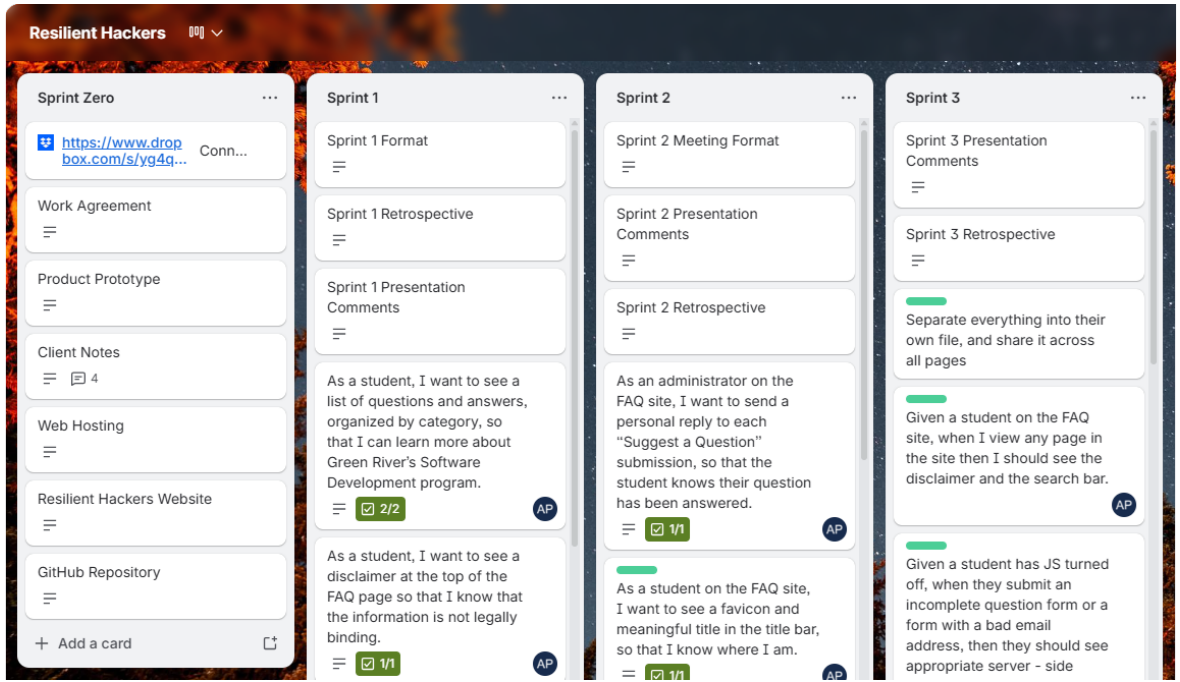
Sprint Board Example
What We've Learned Over 10+ Years
Consistent patterns that distinguish successful teams and projects from struggling ones — informing ongoing curriculum improvements.
✓ What Worked Well
Frequent standups & team meetings
▼Face-to-face collaboration & pair programming
▼Clear team communication
▼Early deployment
▼✗ What Didn't Work
Gaps in scaffolding
▼Poorly scoped projects
▼Timing & coordination issues
▼Lack of student participation
▼Lack of client communication
▼Unclear or changing requirements
▼Poor conflict resolution
▼Technical integration challenges
▼Students "going rogue"
▼Key Insights
Early preparation is critical
Instructors can find one project for multiple teams to work on (best for early classes), or allow each team to work on their own project. Instructors should speak with clients prior to the course beginning, ensuring alignment between project goals and class learning objectives.
Structure, then flexibility
Create clear checkpoints, but allow for project-to-project flexibility. Meeting frequently, shared goal setting, and collaborative project planning all contribute to success. Structure is not rigidity — let students adapt confidently and make progress.
Instructor role must shift from teaching to coaching
As classes progress, formal lessons serve little purpose. More time can be spent in a coach/team format, where students receive job-like advice and self-organize their approaches to problem solving with instructor support — rather than instructor direction.
Adapting This Model at Your Institution
A flexible, scalable guide — start small, expand gradually, find a partner.
Start Small
- 3–6 week short-term projects (a website or small program)
- Assign multiple teams to work on a single project
- Scaffolded steps: setup → checkpoints → conclusion
- Survey participants to identify strengths and weaknesses of the approach
Expand Gradually
- Develop collaboration skills with pair programming
- Include small final projects (solo or team) to build agency
- Substitute project work for siloed assignments to foster long-term investment
Find a Partner
- Work with an open source community
- Find a local non-profit, small business, or organization
- Partner with support organizations like Mentors in Tech or CodeDay Labs
Key Considerations
- Program size and available resources
- Availability of industry partners
- Instructor capacity for coaching vs. teaching
Common Pitfalls
- Trying to scale too quickly
- Insufficient scaffolding in earlier courses
- Over-reliance on capstone alone
Grants, Research & Program Impact
External funding and research have helped validate, expand, and sustain the program's approach to PBL.
Career Launch
careerconnectwa.org/career-launchOther Sources
NSF and additional grant funding supporting tech career pathways
Improved Student Outcomes
Graduates enter the workforce with stronger technical and professional skills, real project experience, and demonstrated ability to work in team environments.
Stronger Industry Connections
Ongoing partnerships with local businesses and non-profits that directly influence coursework and provide real-world context for students.
Increased Employability
Students graduate with portfolios demonstrating real project contributions — to clients, open source projects, and collaborative team environments.
Contributors
Tyler Schrock — tschrock@greenriver.edu
Tina Ostrander — tostrander@greenriver.edu
With input from students and alumni of the Green River College SDEV program.